Horizon Flare
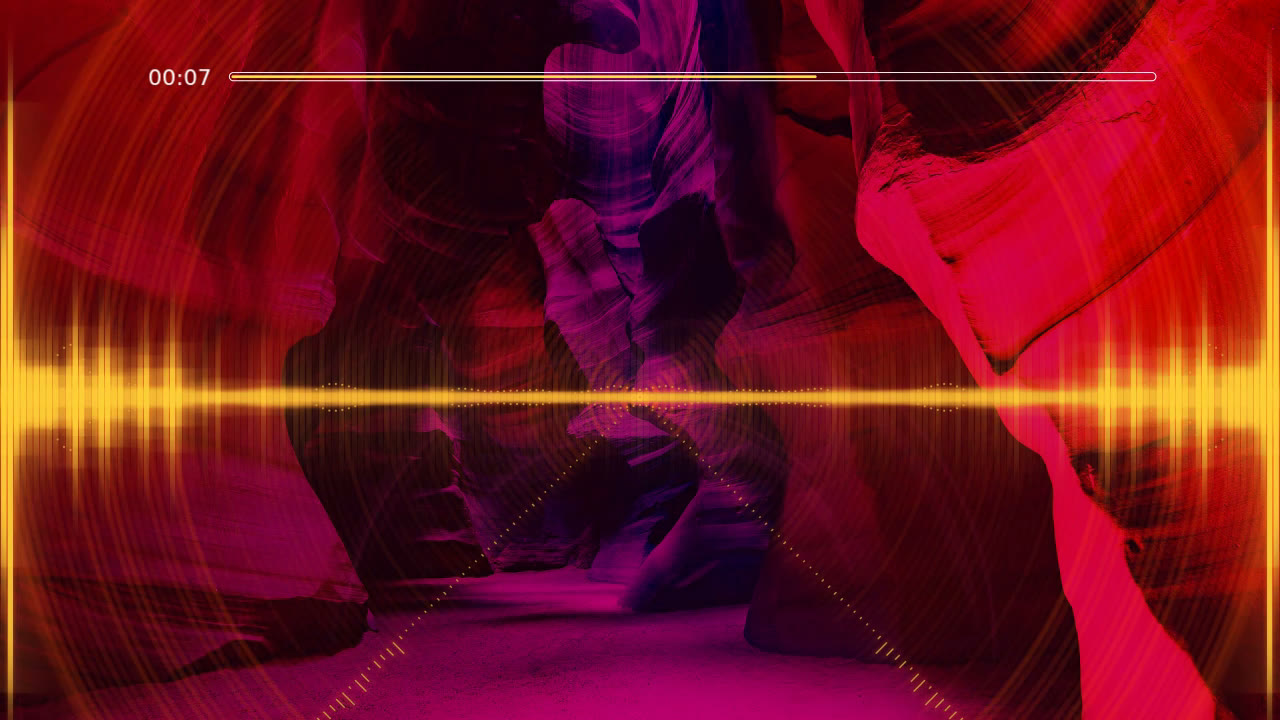
A hot band of light across the frame with spectrum spikes shooting up and down from it, smeared into streaks, haze and rings of light. Bass hits at the outer edges, the highs meet in the middle, and your photo or video glows under one wash of colour. A faithful port of an After Effects visualizer.
Preview free in your browser · No subscription · Pay only when you export · No watermark
Demo videos
Every demo is a real render of this template. Start from one to get exactly this look.
No demo videos yet — try the template with your own track.
About this template
Shape and layout
A thin band of light runs from edge to edge a little below the middle of the frame. Spikes stand on it, mirrored left and right: the lowest notes at the outer edges, the highest meeting in the centre. A row of small dots rides the band, two dotted lines fall from its centre to the bottom edge, and a slim progress bar with the elapsed time sits near the top.
Motion
Each spike follows one narrow band between 20 Hz and 2 kHz and shoots both up and down, so a kick throws tall streaks at the edges while melodies ripple through the middle. The spikes are smeared sideways and upward into soft streaks, and a second copy is spun round the centre into rings that flare with every hit. The dots hop, the diagonals bristle and a faint waveform flickers under the band.
Look and colour
The original After Effects colours: an orange flare, gold spikes and dots, a pink waveform, and a magenta wash multiplied over your photo or video so the whole picture glows in one hue. Presets swap the set, or you pick the four colours yourself. Without a backdrop the band burns over a dark sky tinted in the wash colour.
What you can customize
Every setting below is yours to change in the editor, with the live preview updating as the track plays.
Visualizer
- Color preset
- ClassicAuroraSunsetOceanEmberRoseIceMonoCustom
- Flare color
- The colour of the rings of light spun round the centre of the band.
- Spike color
- The colour of the band, its spikes, the dots and the dotted diagonals.
- Waveform color
- The colour of the faint waveform arcs under the band.
- Tint color
- The colour multiplied over the background photo or video.
- Tint strength
- How strongly the tint colour washes the background. Zero leaves the photo or video in its own colours.
- Flare strength
- How bright the rings of light and the waveform arcs are. Zero leaves the band and its spikes alone.
- Vertical position
- Moves the band of light up or down the frame.
- Peak height
- How far the spikes shoot from the band at full level.
- Audio reactivity
- Progress bar
- A slim bar near the top that fills from left to right as the track plays.
- OnOff
- Elapsed time
- Shows the elapsed time of the track at the left end of the progress bar.
- OnOff
- Attack
- Release
Background
- Background photo
- Background video
- Background dimming
- Background blur
Backdrop effects
Effects for your photo or video backdrop, shared by every template.
- Zoom pump
- Travel
- Camera shake
- Camera sway
- Shockwave
- Lens
- Zoom blur
- Glow pulse
- Light leaks
- Light rays
- Light sweep
- Lens flare
- Fog
- Smoke clouds
- Particle overlay
- Rain on glass
- Echo
- Neon edges
- Glitch
- Pixelate
- Beat pulse
- Perspective tilt
- Liquid
- Flash
- Retro VHS
- Old film
- Backdrop grain
- Grunge overlay
- Dirty lens
- Oil painting
- Watercolor
- Pencil sketch
- Pop art
- Camcorder
- Damaged film
- Memories
- Tritone grain
- Daydream
- Duo wash
- Trippy
- Compression
- Distorted
- Color cycle
- Color grade
- Duotone
- Motion follows
- Light follows
- Texture follows
- Drop
- Follow the song
- Hue drift
- Depth parallax
- Focus rack
- Depth fog
- Keep subject crisp
- Subject rim light
- Subject ghost trails
- Subject pop
- Subject spotlight
- Subject in front
- Beat sync
- Focus pulse
- Vignette pulse
- Mirror
- Double exposure