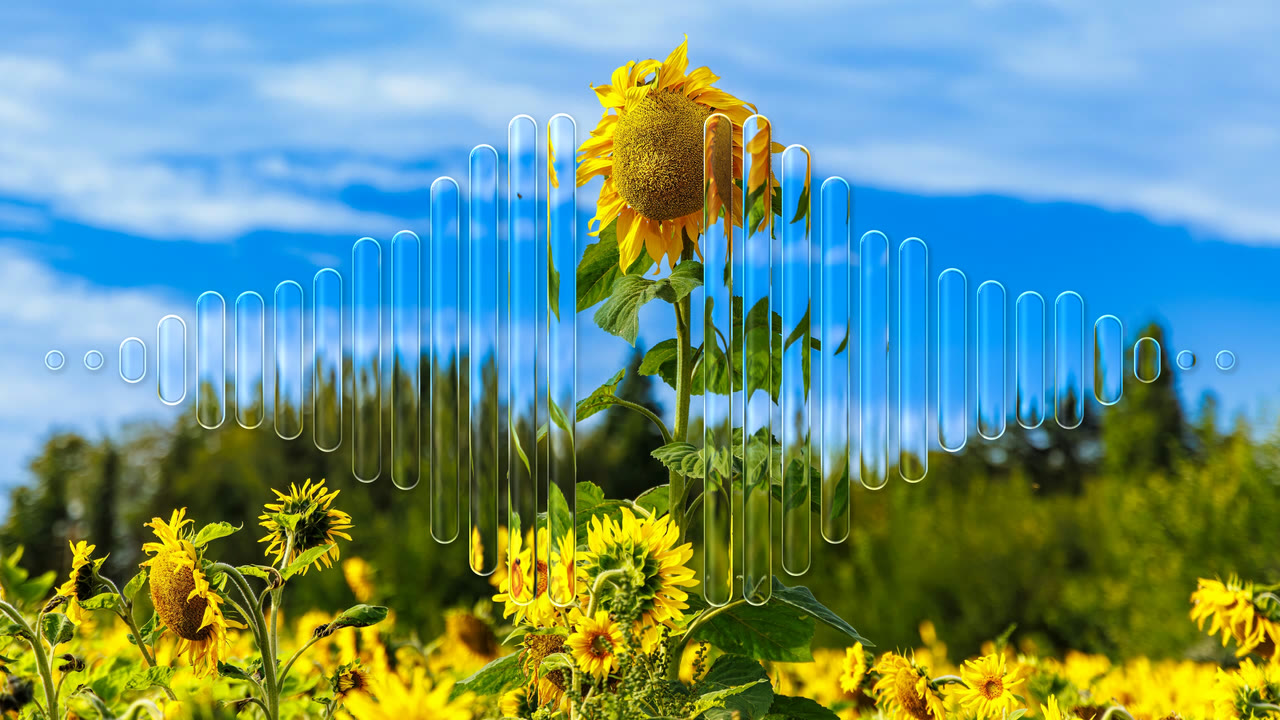
Glass Rods
A spectrum of clear glass rods stands in front of your photo or video, two mirrored halves that grow up and down with the music, with room for your cover art in the middle. Each rod is a little lens that flips and bends the sharp picture behind it, with polished edges that catch the light.
Preview free in your browser · No subscription · Pay only when you export · No watermark
Demo videos
Every demo is a real render of this template. Start from one to get exactly this look.
No demo videos yet — try the template with your own track.
About this template
Shape and layout
Two mirrored halves of round-ended glass rods sit on one horizontal line, split by a gap in the middle that can hold your cover art. Every rod grows up and down at once; at rest it is a small glass bead on the line.
Motion
Each rod follows its own band of the music, from the bass to the treble, and rises when that band gets louder, then sinks back smoothly. By default the bass sits in the middle and the treble at the outer ends; sudden hits add a little extra height.
Look and colour
Your photo or video stays sharp and untouched outside the rods. Inside, each rod acts like a glass lens: the picture behind it shows through flipped and squeezed, with bright polished rims, a soft sheen and a faint shadow. The glass can be clear or tinted.
What you can customize
Every setting below is yours to change in the editor, with the live preview updating as the track plays.
Visualizer
- Spectrum arrangement
- How the two halves are laid out: the same picture repeated, or mirrored with the bass at the outer ends or in the middle.
- RepeatedBass outBass in
- Rods per side
- How many glass rods each half has. More rods are thinner. Tall frames show about half as many.
- Spectrum width
- Centre gap
- The space between the two halves of the spectrum, where the cover sits.
- Vertical position
- Rod thickness
- How wide each rod is, compared with the space between rods.
- Peak height
- Glass strength
- How strongly each rod bends the picture behind it. Higher values flip and squeeze the picture more.
- Shine
- The light on the glass: the bright rims, the caps and the sheen.
- Color preset
- Clear glass, or a tint that colours the picture inside the rods.
- ClearCyanAmberEmeraldRoseBlueVioletCustom
- Custom glass colour
- Spectrum gain
- Noise floor
- Peak contrast
- Attack
- Release
- Liveliness
- Adds a subtle wobble to the bars so a steady tone still looks alive.
- Transient accent
- Extra height and brightness on sudden hits, so drum strikes stand out.
Artwork
- Cover artwork
- Artwork dimming
- Cover size
- Artwork horizontal position
- Artwork vertical position
- Cover corner radius
Background
- Background photo
- Background video
- Background dimming
- Background blur
Backdrop effects
Effects for your photo or video backdrop, shared by every template.
- Zoom pump
- Travel
- Camera shake
- Camera sway
- Shockwave
- Lens
- Zoom blur
- Glow pulse
- Light leaks
- Light rays
- Light sweep
- Lens flare
- Fog
- Smoke clouds
- Particle overlay
- Rain on glass
- Echo
- Neon edges
- Glitch
- Pixelate
- Beat pulse
- Perspective tilt
- Liquid
- Flash
- Retro VHS
- Old film
- Backdrop grain
- Grunge overlay
- Dirty lens
- Oil painting
- Watercolor
- Pencil sketch
- Pop art
- Camcorder
- Damaged film
- Memories
- Tritone grain
- Daydream
- Duo wash
- Trippy
- Compression
- Distorted
- Color cycle
- Color grade
- Duotone
- Motion follows
- Light follows
- Texture follows
- Drop
- Follow the song
- Hue drift
- Depth parallax
- Focus rack
- Depth fog
- Keep subject crisp
- Subject rim light
- Subject ghost trails
- Subject pop
- Subject spotlight
- Beat sync
- Focus pulse
- Vignette pulse
- Mirror
- Double exposure