Tick Ring
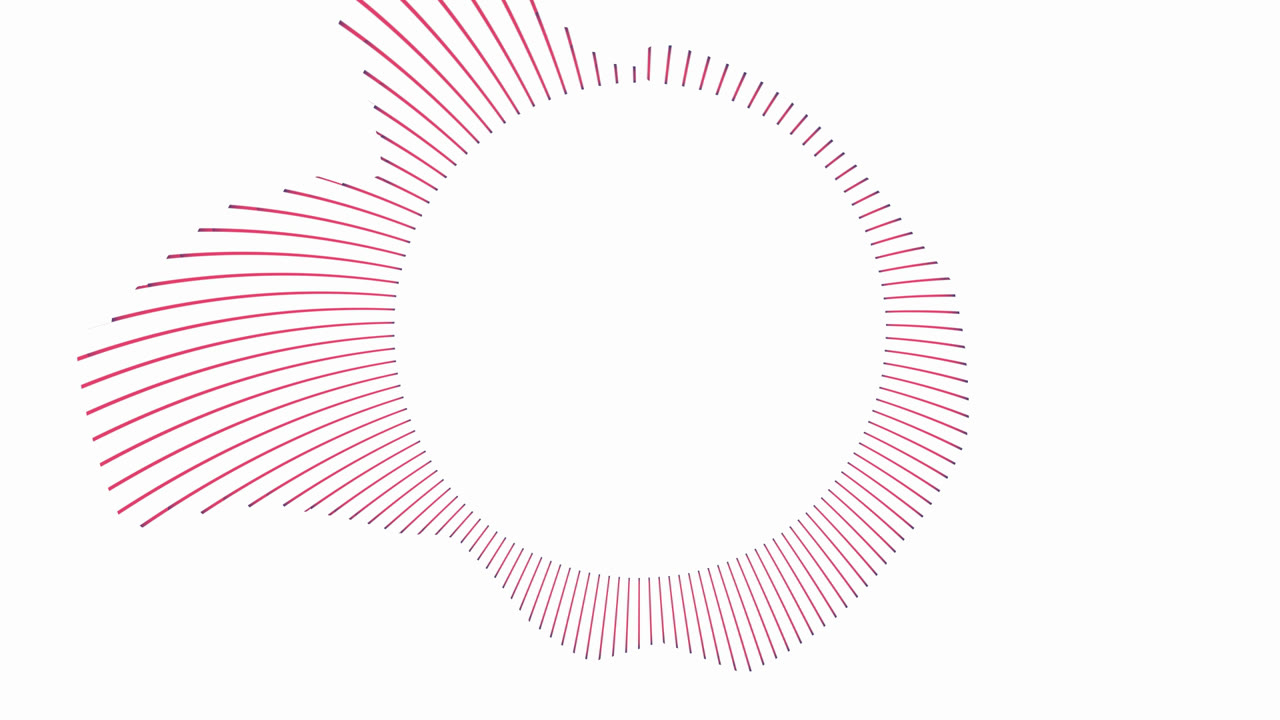
A ring of thin pink ticks around your logo on a clean white background. Every tick follows one narrow band of the low end, and the loud bass ticks grow long and bend into a sweeping fan instead of pointing straight out. Flat and graphic — a faithful port of a classic After Effects logo visualizer, with colour presets and a round or original-shape artwork.
Preview free in your browser · No subscription · Pay only when you export · No watermark
Demo videos
Every demo is a real render of this template. Start from one to get exactly this look.
No demo videos yet — try the template with your own track.
About this template
Shape and layout
A ring of 121 thin ticks sits at the centre of the frame, about 780 px across the short side at rest, slightly taller than it is wide. Each tick is a slat cut out of one of 217 round-capped bars, all wrapped round the centre by a partial polar conversion, so ticks are short and even at silence and a long one curves instead of pointing straight out. An optional logo or cover sits inside, 425 px wide by default.
Motion
Each tick reads one narrow band between 1 and 701 Hz, linearly in level like the original After Effects effect: the lowest band sits just left of the top and the range runs counter-clockwise round the ring. Kicks fling the ticks at the upper left out into long curved strokes that can leave the frame; mids and highs barely move. Ticks rise instantly and settle within a few frames, and a fade-out brings the ring to rest.
Look and colour
Flat strokes with no glow: pink along the body, navy at both ends — the original After Effects colours — on a plain white background, or any preset: Ice, Mono, Midnight, Ember, Noir, or your own three colours. Your logo is drawn whole with its transparency kept, or cropped to a circle, with the app-level artwork shadow following its outline. A photo or video replaces the flat background when set. The caption sits centred under the ring.
What you can customize
Every setting below is yours to change in the editor, with the live preview updating as the track plays.
Visualizer
- Color preset
- A ready-made colour scheme; pick Custom to choose your own colours.
- ClassicIceMonoMidnightEmberNoirCustom
- Background color
- Spectrum color
- The colour of every tick along its body; the tip colour reaches in from both ends.
- Tip color
- The colour at both ends of every tick.
- Ring size
- Tick density
- How many ticks make up the ring: fewer and wider apart, or more and closer together.
- Peak height
- How long the ticks can grow at full level.
- Audio reactivity
- How strongly the visualizer moves with the music — lower for calmer motion, higher for a punchier response.
- Horizontal position
- Moves the whole visualizer left or right across the frame.
- Vertical position
- Moves the whole visualizer up or down the frame.
- Attack
- How quickly the visualizer responds when the sound gets louder.
- Release
- How quickly the visualizer settles after the sound drops.
Artwork
- Artwork image
- Artwork shape
- Original keeps the picture as it is, transparent areas included — right for a logo. Circle crops it to a disc, for square photos and covers.
- OriginalCircle
- Artwork size
Background
- Background photo
- Background video
- Background dimming
- Darkens the background photo or video so the visualizer and text stay readable.
- Background blur
- Softens the background photo or video so it reads as a backdrop, not the subject.
Backdrop effects
Effects for your photo or video backdrop, shared by every template.
- Zoom pump
- How much the background photo or video zooms in on the bass. Zero keeps it at a fixed size.
- Travel
- How far the background photo or video wanders around the frame as the track plays. Zero holds it still.
- Camera shake
- A short camera shake on every kick — a vibration with a slight roll — plus a low rumble with the level. Zero holds the camera still.
- Camera sway
- A slow, smooth roll of the whole scene — visualizer, background, particles and folds — each layer moving its own amount. Zoomed in a little so the corners never show. Zero holds it still.
- Layer parallax
- How differently the layers move while the camera sways: the background least, the particles and the liquid folds most. Zero moves the whole scene as one.
- Shockwave
- Ripple rings spread out from the centre on the kicks and warp the picture as they pass. Zero never fires.
- Lens
- A lens bulge that pumps on the kicks, with a colour fringe in the outer frame that grows with the level.
- Zoom blur
- Radial streaks shoot out from the centre on the kicks, as if the camera rushed in. Zero never streaks.
- Glow pulse
- A soft bloom around the bright parts of the picture that swells on the kicks.
- Light leaks
- Warm patches of light drift slowly over the picture, brighter the louder the music — a film look.
- Light rays
- Shafts of light from the top-left corner, blocked by the darker parts of the picture, brighter with the music and flaring on the kicks. Zero keeps them off.
- Light sweep
- A soft, slanted band of light crosses the picture once a bar — or, without the track’s analysis, on a strong kick every few seconds at most. Zero never sweeps.
- Lens flare
- Long horizontal streaks of bluish light stretch out of the brightest parts of the picture on the kicks, and rest faintly in between. Zero keeps them off.
- Fog
- Slow drifting mist over the picture, thicker toward the bottom and breathing gently with the music. Zero keeps the air clear.
- Particle overlay
- A layer of drifting particles over the picture that brightens with the music.
- OffDustBokehSnowSparksRainFirefliesConfettiBubblesStarsDriftGlow orbs
- Particle amount
- How many particles fill the frame.
- Liquid folds
- Soft, blurred sheets of colored liquid that drift and fold across the frame in front of the visualizer. Zero turns them off.
- Fold color
- The liquid folds' color. Auto takes the template's own accent color.
- AutoIndigoVioletCrimsonTealAmberIceCustom
- Custom fold color
- The color the folds take with Custom picked.
- Rain on glass
- Raindrops on a pane in front of the picture: small beads, and bigger drops that slide down and bend the picture. Zero keeps the glass dry.
- Echo
- The previous frame lingers, slightly enlarged, so motion leaves trails and the kicks pull you into a tunnel.
- Neon edges
- The picture's own outlines traced in cycling neon colours, brightest on the kicks.
- Glitch
- Digital bursts on the kicks: sliced rows jump sideways, blocks freeze and the colour channels split. Zero never fires.
- Pixelate
- The picture breaks into square blocks on the kicks and sharpens again within a quarter of a second. Zero keeps it sharp.
- Beat pulse
- The picture breathes in time with the music, swelling and glowing just before each beat so it lands on it. Needs the track’s analysis.
- Perspective tilt
- Tilts the picture like a card in 3D, swaying slowly with the music and nodding on the kicks, with a light that follows the turn. Zero keeps it face-on.
- Liquid
- The picture ripples like a liquid surface, more strongly the louder the music. Zero keeps it flat.
- Flash
- A short flash toward white on the strongest kicks, at most two per second. Zero never flashes.
- Retro VHS
- Tape look: a gentle wobble, colour bleed, scan lines, noise and a tracking band that rolls through on the beat.
- Old film
- Projector look: flicker, hair scratches, dust, a gentle weave and a sepia lean.
- Backdrop grain
- Adds fine film-like noise over the frame for a textured, less digital look.
- Color grade
- A colour treatment over the whole picture — and the colours of the built-in backdrop when you set no photo or video.
- NaturalWarmCoolMonoFaded
- Duotone
- Maps the picture’s light and shade onto two colours, dark to light. Custom uses the two colours you pick below.
- OffMidnightSunsetForestGoldRoseCustom
- Duotone shadows
- The colour the darkest parts of the picture turn into.
- Duotone highlights
- The colour the brightest parts of the picture turn into.
- Motion follows
- What the camera moves follow — zoom pump, shake, tilt, shockwave, lens, zoom blur, liquid, depth, subject pop and focus. A stem needs the track’s stems.
- Whole mixDrumsBassVocals
- Light follows
- What the light follows — glow, flashes, light leaks, rays, sweep, lens flare, fog, vignette, spotlight, rim light and hue steps. A stem needs the track’s stems.
- Whole mixDrumsBassVocals
- Texture follows
- What the texture effects follow — glitch, pixelate, VHS, echo trails, neon edges, particles, rain on glass and subject ghost trails. A stem needs the track’s stems.
- Whole mixDrumsBassVocals
- Drop
- The picture tightens, dims and drains of colour over the bars before a drop, then bursts open on it. Needs the track’s analysis.
- Follow the song
- Calmer reactions in the quiet parts of the song and bigger ones in the loud parts, easing at each change. Needs the track’s analysis.
- Hue drift
- The colours slowly cycle around the hue wheel and take a step on every kick. Zero keeps them as they are.
- Depth parallax
- Sways the near parts of the photo more than the far ones, and swells them on the kicks, so a flat picture gains depth. Needs the photo's depth map: off until it is ready, and on a video.
- Focus rack
- Blurs by depth like a lens: at rest the near part is sharp and the far part soft, and the focus pulls to the background and back on the kicks. Needs the photo's depth map; off until it is ready.
- Depth fog
- A pale haze over the far parts of the picture that breathes with the music, so the near parts stand out. Needs the photo's depth map; off until it is ready.
- Keep subject crisp
- Keeps the photo's subject untouched while blur, glow, echo, tape, grade and grain go to the background only. Needs the photo's subject map; off until it is ready.
- Subject rim light
- A neon rim of light hugging the photo's subject, with a soft halo behind it, flaring on the kicks. Needs the photo's subject map; off until it is ready, and on a video.
- Subject ghost trails
- Pale copies of the subject linger and drift outward with the music while the background stays put. Needs the photo's subject map; off until it is ready, and on a video.
- Subject pop
- The photo's subject swells toward the viewer on the kicks while the background holds still. Needs the photo's subject map; off until it is ready, and on a video.
- Subject spotlight
- Darkens the picture around the subject, like a spotlight that follows it and breathes with the music. Needs the photo's subject map; off until it is ready, and on a video.
- Beat sync
- Lands the stepping effects — the kaleidoscope, the hue drift and the shockwave rings — on the beat or the bar instead of on every bass hit. Needs the track’s analysis.
- OffEvery beatEvery bar
- Focus pulse
- The picture softens and dims as the music settles and snaps sharp and bright on the hits. Zero keeps it steady.
- Vignette pulse
- Mirror
- Folds the picture into mirrored copies. The kaleidoscope turns slowly and steps on the kicks.
- OffLeft-rightFour-wayKaleidoscope
- Particles behind subject
- Spreads the particles through the scene's depth, so some pass behind the photo's subject. Needs the photo's depth map; off until it is ready, and on a video.
- NoYes