LED Meter
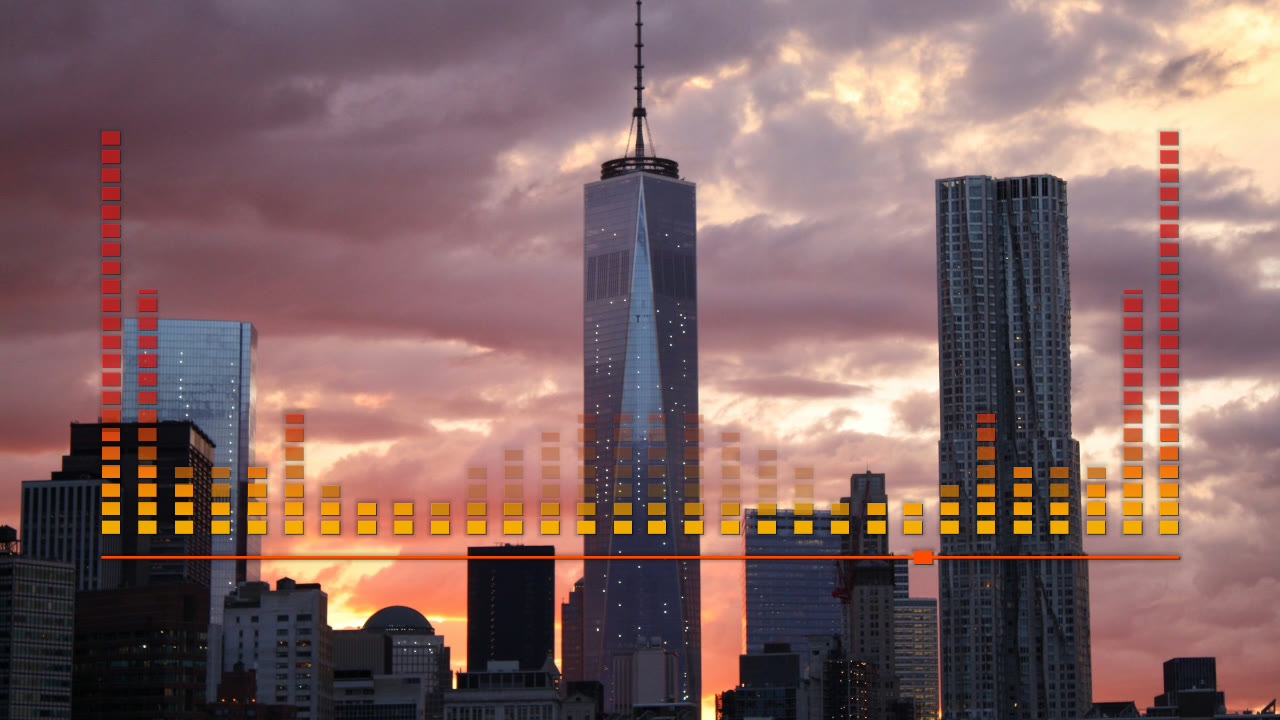
One classic LED equalizer on top your photo or video: thirty columns of cells wey dey shine go up with the music, mirror for left and right, bass for the edges and high sound for the middle, with one thin progress line and square marker under am. Faithful port of one classic After Effects visualizer.
Preview free for your browser · No subscription · Pay only when you export · No watermark
Watch Demo Videos
Every demo na real render of dis template. Start from one make you get exactly dis look.
No demo video yet — try the template with your own track.
About dis template
The Shape and Layout
Thirty columns of rectangle cells stand on one base line for the lower middle of the frame, like 84 % of the width, mirror for left and right: fifteen bands for each half, bass for the outside edges and high sound near the centre. The base row dey always on. One thin progress line with square playhead dey run just under the row, and the caption dey under am.
Motion
Each column dey follow one band of the spectrum, straight with the level like the original After Effects effect, and e height dey jump by whole cells. The main bars dey read 100-1370 Hz; one faint second layer behind dem dey read 20-100 Hz and pump with the kick. New cell dey light dim first and come bright after few frames, and bar wey dey fall go leave dim cells on top am small time. The playhead dey move from left to right as the song dey play.
The Look and Colour
Flat rectangle cells for one up-and-down colour ramp, amber for the base wey dey turn red for the top by default, with orange progress line; other presets go give the plain white of the original, green-to-red VU meter, ice, ultraviolet, sunset or rainbow across the columns. Soft drop shadow dey keep the cells readable on top bright picture, and optional glow dey add small halo. The picture dey show full frame and untouched unless you dim or blur am.
Wetin you fit customize
Every setting below na yours to change for the editor, the live preview go update as the track dey play.
Visualizer
- Colour preset
- The colours of the cells, from the base line go reach the top, and the progress bar. Ember na the amber-to-red look, White na the original; Custom dey use your own three colours.
- EmberWhiteVU meterIceUltravioletSunsetRainbowYour Own
- Bottom colour
- The colour of the cells for the base line; e go blend enter the top colour as the columns go up.
- Top colour
- The colour wey tall column go reach for the top.
- Progress colour
- The colour of the progress line and the square playhead under the bars.
- Progress bar
- One thin line under the bars with square marker wey dey move from left to right as the song dey play.
- OnOff
- Drop shadow
- Dark shadow under the cells and the progress bar, so dem go still show well on top bright picture.
- OnOff
- LED glow
- Small soft halo around the cells wey dey on, like say na real LED.
- OnOff
- Peak height
- How tall the columns fit grow for full level, for the main bars and the bass layer together.
- Audio response level
- How strong the visualizer go move follow the music — lower for calmer motion, higher for punchier response.
- Sideways position
- E go move the whole visualizer left or right across the frame.
- Up-down position
- E go move the whole visualizer up or down the frame.
- Attack
- How fast the visualizer go respond when the sound louder well.
- Release
- How fast the visualizer go settle after the sound drop.
Background
- Background photo
- Background video
- Background darkening
- E go darken the background photo or video so the visualizer and text go stay readable.
- Background blur
- E go soften the background photo or video so e go read as backdrop, no be the main subject.
Background Effects
Effects for your photo or video backdrop, every template dey share dem.
- Zoom Pull
- Na how much the background photo or video go zoom enter anytime bass hit. Zero go keep am for one size.
- Waka
- How far the background photo or video go waka round the frame as the track dey play. Zero go hold am still.
- Camera Shake-Shake
- Short camera shake-shake for every kick — small vibration with light roll — plus low rumble wey follow the level. Zero go hold the camera steady.
- Camera Sway
- The whole scene go dey sway slow and smooth — visualizer, background, particles and folds — each layer im own amount. E go zoom enter small so corners no show. Zero go hold am still.
- Layer Parallax
- How different the layers go move as the camera dey sway: the background go move pass small, the particles and the liquid folds go move pass. Zero go move the whole scene as one.
- Ripple Blast
- Ripple rings dey spread comot from the centre anytime kick drop, e go warp the picture as e dey pass. Zero mean e no go ever fire.
- Lens
- Lens go bulge anytime kick drop, plus colour fringe for the outer frame wey dey grow as the level rise.
- Zoom Streak
- Streaks go shoot comot from the centre anytime kick drop, as if the camera rush enter. Zero mean e no go ever streak.
- Glow Swell
- Soft bloom dey surround the bright part of the picture, e go swell anytime kick drop.
- Light Patches
- Warm patches of light dey drift small-small over the picture, e go brighten well well as the music loud pass — na film look be dis.
- Light Rays
- Light rays wey dey come from the top-left corner, dark parts of the picture dey block am, e go bright with the music and flash for kicks. Zero off am.
- Light Sweep
- Soft slanted light go cross the picture once every bar — or for strong kick, once in some seconds, if the track never get analysis. Zero off am.
- Lens Flare
- Long flat lines of bluish light go stretch comot from the brightest parts of the picture for the kicks, and stay small in between. Zero off am.
- Fog
- Mist wey dey drift slow for top the picture, e thick pass for down and e dey breathe small with the music. Zero go keep the air clear.
- Particle Layer
- Layer of particles dey drift for top the picture, e dey brighten with the music.
- OffDustBokehSnowSparksRainFirefliesConfettiBubblesStarsDriftGlow Orbs
- Particle Level
- How many particles go fill the frame.
- Liquid Folds
- Soft, blur sheets of colour liquid wey dey float and fold across the frame for front of the visualizer. Zero go off dem.
- Fold Colour
- The liquid folds colour. Auto go take the template own accent colour.
- AutoIndigoVioletCrimsonTealAmberIceYour Own
- Your Own Fold Colour
- The colour wey the folds go take when you pick Your Own.
- Rain For Glass
- Rain drops for glass wey dey front the picture: small beads and big drops wey dey slide down and bend the picture. Zero go keep the glass dry.
- Echo
- The previous frame go linger, e small bigger pass, so motion go leave trail and the kicks go pull you enter tunnel.
- Neon Outline
- The picture own outlines dey trace for cycling neon colours, e go bright well well for the kicks.
- Glitch
- Digital burst for the kicks: sliced rows go jump sideways, blocks go freeze and the colour channels go split. Zero mean e no go ever fire.
- Pixel Blocks
- The picture go scatter into square blocks for the kicks and clear back inside quarter second. Zero go keep am sharp.
- Beat Swell
- The picture dey breathe follow the music, e go swell and glow small before every beat so e go land well. E need the track analysis.
- 3D Tilt
- E go tilt the picture like card for 3D, e go sway small-small follow the music and nod for the kicks, with light wey follow the turn. Zero go keep am face-on.
- Liquid
- The picture go ripple like liquid surface, e go strong pass as the music loud well. Zero go keep am flat.
- Flash
- Short flash go show near white for the strongest kicks, no pass two times for one second. Zero mean e no go ever flash.
- Old VHS
- Tape look: small wobble, colour bleed, scan lines, noise and a tracking band wey dey roll through for the beat.
- Old Movie
- Projector look: flicker, hair scratches, dust, small weave and sepia lean.
- Background Grain
- E go add fine film-like noise for top the frame make e get texture, less digital look.
- Colour Grade
- Colour treatment for the whole picture — and the colours of the built-in background when you no set any photo or video.
- NaturalWarmCoolMonoFaded
- Two-Colour
- E go turn the picture light and shadow to two colours, dark to light. Your Own go use the two colours wey you pick below.
- OffMidnightSunsetForestGoldRoseYour Own
- Two-Colour Dark
- The colour wey the darkest parts of the picture go turn.
- Two-Colour Light
- The colour wey the brightest parts of the picture go turn.
- Movement Follow
- Wetin camera moves dey follow — zoom pull, shake, tilt, ripple blast, lens, zoom streak, liquid, depth, subject bounce and focus. One stem need the track stems.
- Full MixDrumsBassVocals
- Light Follow
- Wetin the light dey follow — glow, flash, light patches, rays, sweep, lens flare, fog, vignette, spotlight, rim glow and colour steps. One stem need the track stems.
- Full MixDrumsBassVocals
- Texture Follow
- Wetin the texture effects dey follow — glitch, pixel blocks, VHS, echo, neon outline, particles, rain for glass and subject ghost trail. One stem need the track stems.
- Full MixDrumsBassVocals
- Drop
- The picture go tighten, dim and lose colour for the bars before a drop, then e go burst open for am. E need the track analysis.
- Follow The Song
- E go react small for the quiet parts of the song and big for the loud parts, e go change smooth. E need the track analysis.
- Colour Drift
- The colours go cycle small-small round the hue wheel and take one step for every kick. Zero go keep dem as dem be.
- Depth Sway
- E go sway the near part of the photo pass the far ones, and e go swell dem for the kicks, so flat picture go get depth. E need the photo depth map: e off until e ready, and for video.
- Focus Pull
- E go blur by depth like lens: for rest, the near part sharp and the far part soft, and the focus go pull go the background come back for the kicks. E need the photo depth map; e off until e ready.
- Depth Haze
- Pale haze dey cover the far part of the picture, e dey breathe follow the music, so the near part go stand out well. E need the photo depth map; e off until e ready.
- Sharp Subject Only
- E go keep the photo subject untouch while blur, glow, echo, tape, grade and grain dey touch only the background. E need the photo subject map; e off until e ready.
- Subject Rim Glow
- Neon rim of light go hug the photo subject, with soft halo behind am, e go flare for the kicks. E need the photo subject map; e off until e ready, and for video.
- Subject Ghost Trail
- Pale copies of the subject go linger and drift comot with the music while the background dey stay put. E need the photo subject map; e off until e ready, and for video.
- Subject Bounce
- The photo subject go swell towards the viewer for the kicks while the background dey hold still. E need the photo subject map; e off until e ready, and for video.
- Subject Light
- E go darken the picture round the subject, like spotlight wey dey follow am and breathe follow the music. E need the photo subject map; e off until e ready, and for video.
- Beat Match
- E go land the stepping effects — the kaleidoscope, the hue drift and the shockwave rings — for the beat or the bar instead of every bass hit. E need the track analysis.
- OffBeat by BeatBar by Bar
- Focus Swell
- The picture go soften and dim as the music settle, then e go snap sharp and bright for the hits. Zero go keep am steady.
- Vignette Swell
- Mirror
- E go fold the picture enter mirrored copies. The kaleidoscope go turn small-small and step for the kicks.
- OffLeft and RightFour SidesKaleidoscope
- Particles Pass Behind Subject
- E go spread the particles through the scene depth, so some go pass behind the photo subject. E need the photo depth map; e off until e ready, and for video.
- NoYes